Free AI-Assisted Software Development with OpenCode
Free AI-Assisted Software Development with OpenCode
Using AI for programming doesn't necessarily mean incurring the cost of a new monthly subscription.
If you are a developer who prefers working via the command line, OpenCode offers a great way to experience "agentic coding" using free models from various providers. You can use OpenCode’s free Zen models, add free inference endpoints from NVIDIA, and switch between providers if (when) you hit rate limits.
While this doesn't provide unlimited AI coding, it can be surprisingly powerful and useful—and best of all, it is free to get started, and stays free, unless you really increase your usage.
Installing OpenCode
Start by visiting the OpenCode website.
OpenCode offers several installation methods, including:
curlnpmbunbrewparu
Choose the method that suits your operating system and copy the installation command into your terminal.
Once installed, there is no need to set up a bunch of API keys; there's an easier way to get started.
Connecting OpenCode to OpenCode Zen
Open OpenCode Zen and follow the steps outlined in the Get started with Zen section.
You will link your GitHub account to OpenCode. You might see an option to add payment (billing) information, but you do not need to do this for this setup, as we will be using only the free models. After linking your account, open your command-line interface and run the following command:
opencodeOpenCode will connect to opencode.ai and generate an API key for your Zen account.
At this point, you are ready to start using the models provided by OpenCode via Zen.
Understanding Free Models
The free models available via Zen are subject to change, so check the pricing page periodically:
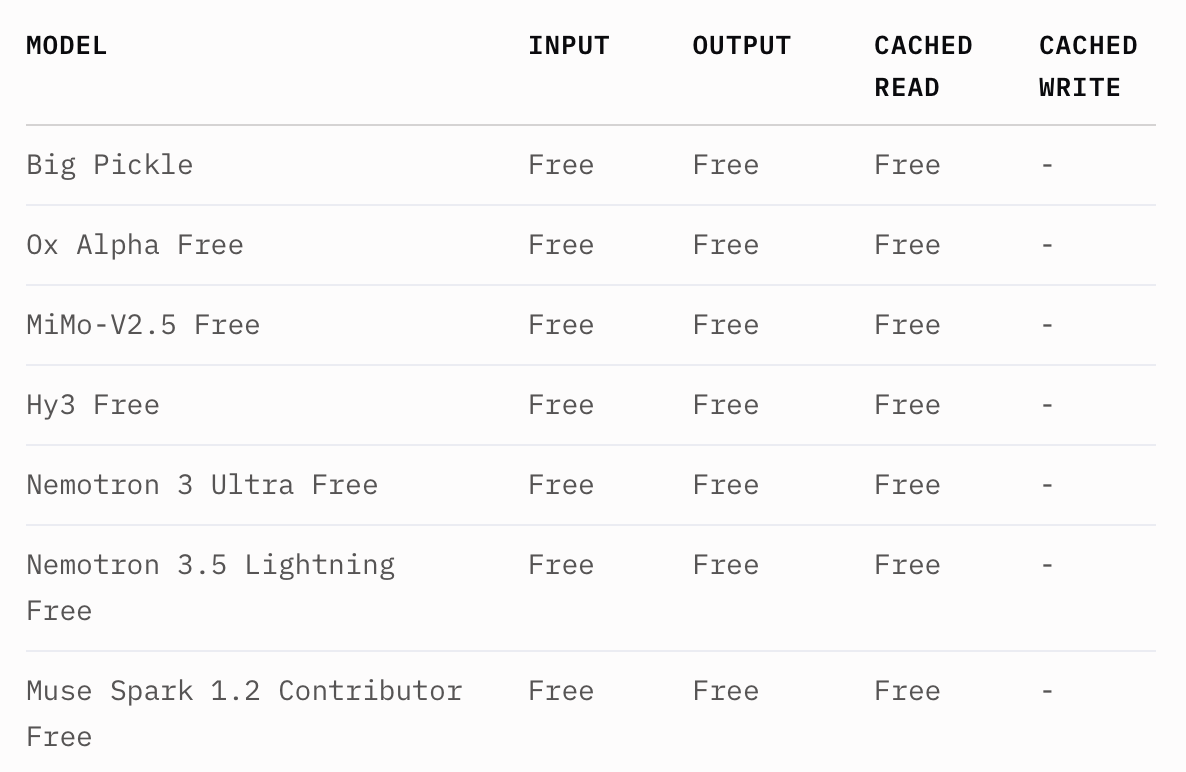
Look specifically for models listed as free. The free plan is subject to a usage limit, which resets at midnight UTC. Your experience with this limit may vary significantly; I have had days when I exhausted the allowance just a few hours after the reset, while on other days, I never reached the limit at all.
This makes the free plan useful, but it is not an option I would rely on as a sole provider of AI services.
Extending Your Zen Usage
There is a simple trick that can make a surprisingly big difference (You won't believe #1!).
When you have been working in a session for a while, enter the following command:
/newThis starts a new OpenCode session.
Why is this command important?
An agentic coding session can accumulate a massive amount of context; Your previous prompts, responses, tool calls, and other conversation history become part of what the model needs to process. As the session lengthens, you effectively burden every subsequent interaction with additional overhead.
Starting a new session, however, provides the model with a clean context (free of previous data).
Naturally, you will lose the conversation history, so avoid doing this in the middle of a task where that history is
crucial. Yet, when you reach a natural stopping point, the /new command can make your token consumption much more
manageable.
OpenCode will compress the session when the usage gets full, but it controls what falls out of context. For a long-running process, compaction is better than nothing, but don't underestimate a fresh session for every task.
Adding Free NVIDIA Models
This is where the setup process gets interesting.
The NVIDIA Build platform offers access to a wide range of models via NVIDIA-hosted inference APIs.
NVIDIA currently allows developers to use its models for free during the prototyping phase. Instead of charging per token, the free plan relies primarily on request-rate limits.
According to NVIDIA’s current FAQ, most models allow up to 40 requests per minute on the free plan, with no charges based on token count. Your specific limit is displayed in the NVIDIA dashboard. If you later require greater capacity, NVIDIA offers options to use partner endpoints or to self-deploy a NIM model.
The nature of this limitation differs significantly from the one found in Zen's free plan. Instead of having a relatively limited usage quota consumed throughout the day, you are generally constrained by the allowed request rate. For an individual developer routinely engaged in agentic coding, a limit of 40 requests per minute is a very generous ceiling.
Creating an NVIDIA API Key
Go to NVIDIA Build and log in or create an account.
Once you are in the dashboard, generate an API key.
Next, return to OpenCode and enter the following command:
/connectLocate NVIDIA in the list of providers and enter the API key you just created.
That’s it.
You can now use the NVIDIA models available via the Build platform with OpenCode.
The available model lineup will change over time, so do not rely on this link as a static list of specific models; instead, consider it...